
Creating Interactive Videos is now more flexible, organized, and powerful than ever before.
We are excited to announce a major upgrade to Interactive Video. The new Interactive Video component introduces a modern timeline that makes it easier to create engaging video experiences with interactive content, multiple media assets, and advanced viewer journeys. With support for multiple video clips, audio tracks, timeline triggers, chapters, and interactive components, users now have greater control over how video experiences are built and delivered.
The Challenges of Traditional Interactive Video Creation
Building Interactive Videos often requires coordinating multiple pieces of content, timing interactions precisely, and managing complex user journeys. Traditional video editing workflows can make it difficult to organize content, synchronize interactions, and maintain control over the viewer experience.
Common challenges include:
- Managing multiple media assets within a single experience.
- Controlling when interactive content appears and disappears.
- Creating branching journeys and guided experiences.
- Organizing complex video timelines.
- Synchronizing media, content, and user interactions.
What’s New in Interactive Video
This release introduces a completely redesigned timeline experience that gives creators greater flexibility and control.
A Multi-Layer Timeline
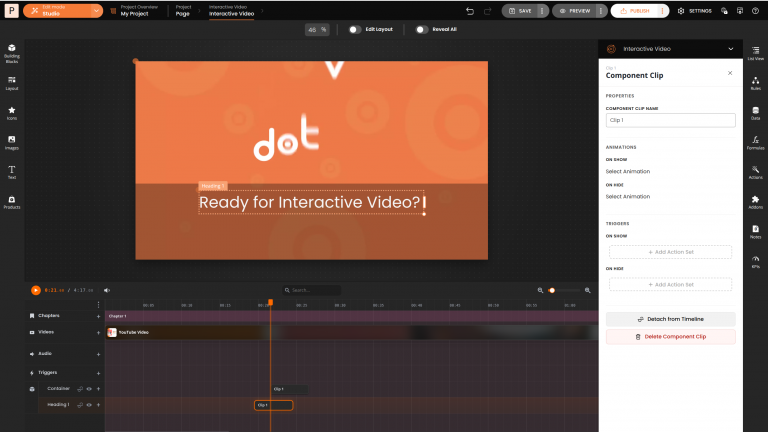
The new timeline allows you to manage videos, audio, interactive content, and triggers from a single workspace. You can now build more sophisticated experiences while maintaining a clear overview of your content.
New capabilities include:
- Multiple video clips on a single timeline.
- Dedicated audio lanes.
- Component clips for media and interactive content.
- Chapters for organizing experiences.
- Timeline triggers for actions at specific moments.
Advanced Timeline Editing
Managing content on the timeline is now faster and more intuitive. Creators can directly arrange and control media and interactive elements through drag-and-drop editing.
Features include:
- Drag video, audio, and component clips directly onto the timeline.
- Resize clips to control when content appears and disappears.
- Organize content using dedicated lanes.
- Search timeline components by name.
- Zoom, scroll, preview, and mute directly within the studio.
Simplified Component Management
Interactive content now works seamlessly with the timeline. When components are added to the Interactive Video canvas, they automatically become part of the timeline workflow.
Key improvements include:
- Automatic timeline attachment for components.
- No need to manually configure time containers.
- Components can be detached when persistent visibility is required.
- Support for show and hide transitions.
- On Show and On Hide triggers for greater control.
Create Rich Interactive Experiences
The new Interactive Video component gives creators more ways to guide viewers through content. Build experiences that react to user actions, reveal content at key moments, and create personalized viewing journeys.
Interactive capabilities include:
- Timeline-based triggers.
- Video clip triggers.
- Component clip triggers.
- Playback controls and timeline navigation actions.
- Reveal and hide content dynamically.
- Branching video journeys and guided experiences.
Flexible Player Controls
Different video experiences require different levels of viewer control. The upgraded Interactive Video component allows creators to configure player controls based on the intended experience.
For example:
- Hide controls for guided storytelling experiences.
- Display controls for product showcases and video catalogs.
- Customize playback behavior to match user journeys.
Build More Powerful Interactive Videos
The new Interactive Video component introduces a modern timeline-based workflow designed to simplify content creation while expanding what is possible with interactive video. The new studio provides the flexibility and control needed to create guided product tours, training experiences, shoppable videos, educational content, and personalized viewer journeys.
Explore the new Interactive Video experience and start creating more engaging video journeys today.