Creating Interactive Experiences with AI just got more flexible.
We’ve introduced two new features to the Dot.vu AI Interactive Builder, giving you greater control over how your components work and how their content is understood by search engines and AI-powered search tools.
You can now create custom versions of existing components to extend their functionality beyond standard settings, while new SEO & AI Search capabilities help make Interactive Content more accessible and discoverable.
Let’s take a closer look at what’s new.
Customize Existing Components Beyond Their Standard Settings
Building with reusable components makes creating Interactive Experiences faster, but sometimes you need functionality that isn’t available in the standard settings.
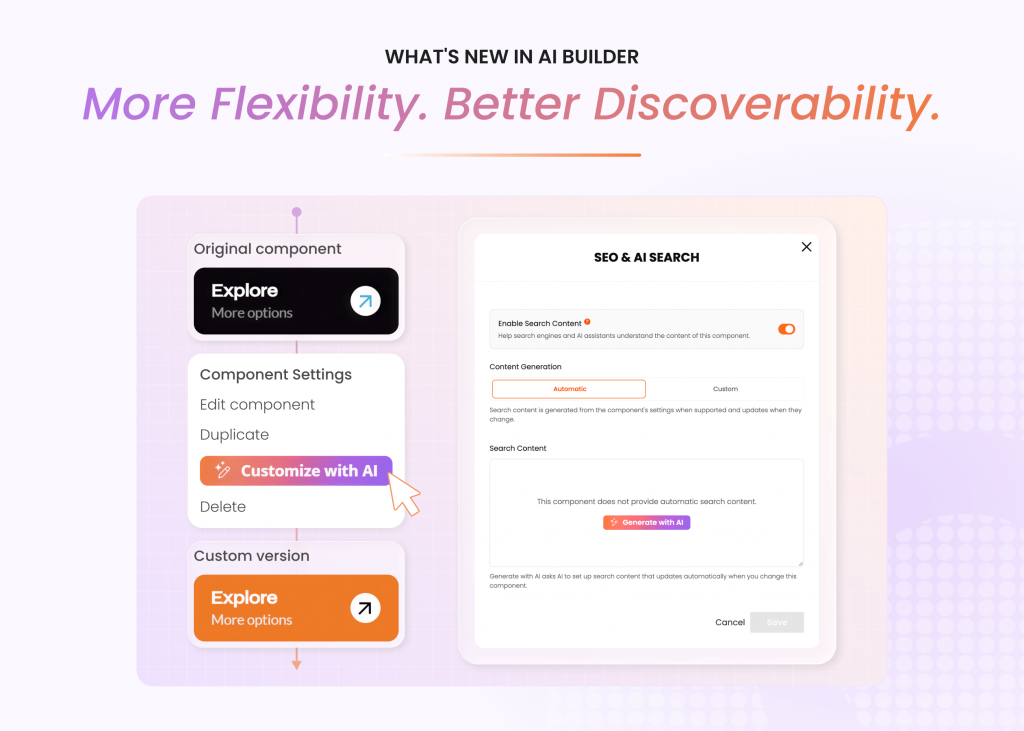
With the new Create Custom Version feature, you can take an existing synced component and make it your own. This allows the AI Builder to modify its underlying code and configuration, giving you the flexibility to add new features or change how the component works.
How Does It Work?
Let’s say you’ve added a Button component to your Interactive Experience, but you want to include an icon that the component doesn’t currently support.
Instead of building a new button from scratch, simply ask the AI Builder to add an icon.
If the requested change goes beyond the component’s standard customization options, the AI Builder will suggest creating a custom version.
Once you confirm:
- A custom copy is created: The component is copied into your account as an independent version.
- More customization becomes available: The component is no longer limited to the original synced version’s settings.
- AI can make the changes: The AI Builder can modify the component’s code and configuration to introduce the requested functionality.
This gives you the convenience of starting with an existing component while maintaining the flexibility to customize it for your specific needs.
Create a Custom Version Manually
You can also create a custom version without prompting AI.
Simply open the component’s settings menu in the AI Builder and select Create Custom Version.
Once converted, you can use AI to further customize the component beyond its original capabilities.
Creating a custom version is free. However, subsequent AI modifications use AI credits and may cost more than standard AI customization. We recommend previewing and testing your changes before publishing.
Make Interactive Content More Discoverable With SEO & AI Search
Interactive Experiences often contain valuable content that isn’t immediately visible when a page loads.
For example, a quiz may initially display only a Start button, while its questions and answers become visible as visitors interact with it. This can make it more difficult for search engines and AI-powered tools to understand the full content of the experience.
The new SEO & AI Search feature helps address this by allowing components to expose relevant content through search metadata, improving how search engines and AI tools interpret the information within them.
Automatically Generate Search Content
With Automatic mode, supported components generate search content directly from their settings.
This content stays synchronized with the component, so when you update its settings, the search content updates accordingly.
For example, if you change a quiz from recommending cars to helping visitors find suitable housing, its search content can automatically reflect those changes.
Customize Your Search Content
For greater control, Custom mode allows you to write or edit the search content yourself.
This is useful when you want to provide a more specific description or determine exactly what information search engines and AI tools can access.
Manage SEO & AI Search Settings
The feature is available in both AI Builder and AI Customization through each component’s settings menu.
From there, you can:
- Enable or disable search content: Control whether a component exposes search content, with the feature enabled by default.
- Use Automatic mode: Generate search content that updates with supported component settings.
- Generate with AI: Add automatic search content functionality to components that don’t already support it.
- Use Custom mode: Write and manage your own search content.
These options make it easier to support SEO and Generative Engine Optimization (GEO) while maintaining control over how your interactive content is presented to search engines and AI-powered tools.
Build With More Flexibility and Control
These latest AI Builder updates make it easier to create Interactive Experiences that meet your needs while supporting better content discoverability. You can extend existing functionality without starting from scratch. And with SEO & AI Search metadata, you can help search engines and AI tools better understand the content within your experiences.