

Building Interactive Virtual Tours is now more immersive, intuitive, and flexible than ever before.
We are excited to announce a major upgrade to Interactive Virtual Tour, introducing a completely refreshed editing experience, modernized settings management, and a new approach to positioning content directly within virtual environments.
This update represents one of the biggest improvements to Interactive Virtual Tour to date, making it easier to create engaging experiences while giving creators greater control over how content appears inside their scenes.
A New Way to Build in 3D
One of the biggest changes in this release is the removal of Hotspot Containers.
Instead of relying on dedicated containers, creators can now position virtually any component directly within the 3D environment. Interactive content becomes part of the scene itself, creating a more natural workflow and greater creative freedom.
Components can be dragged directly from Building Blocks and placed into the panorama, reducing setup time and simplifying the creation process.
More Precise Positioning Controls
Creating immersive virtual experiences often depends on precise placement.
This release introduces new positioning controls that make it easier to align and adjust content directly within the scene.
You can now:
- Move components directly inside the panorama.
- Resize, scale, and rotate elements with intuitive controls.
- Position content using new 3D corner alignment tools.
- Fine-tune placements for greater visual accuracy.
Combined with perspective-based overlays, content now feels more connected to the environment it belongs in.
A More Immersive Editing Experience
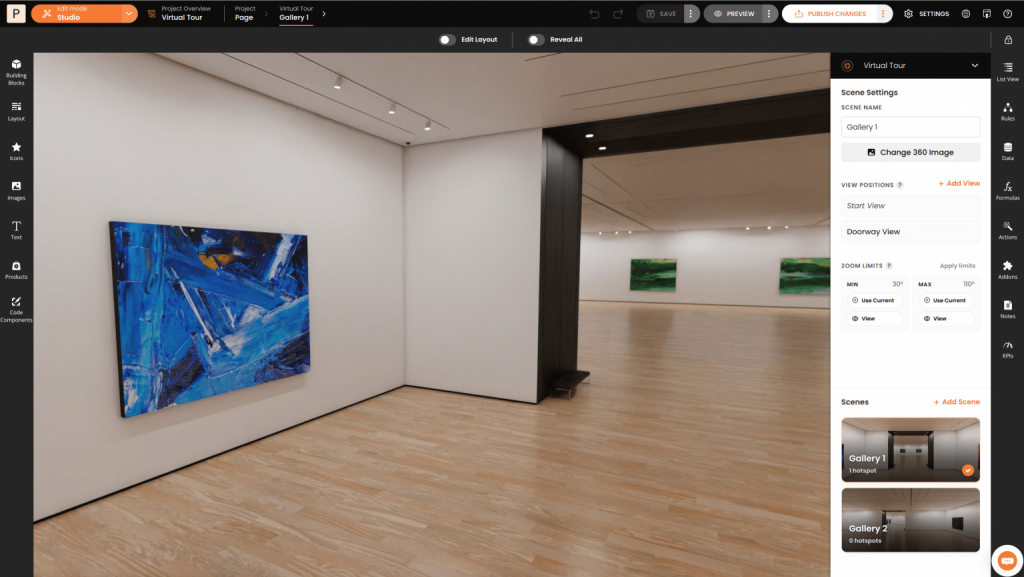
The editing experience itself has also been redesigned.
A new full-canvas editing mode removes unnecessary distractions and provides more space to work directly within the virtual environment.
With canvas controls hidden during editing and overlays rendered in perspective, creators can focus on building experiences instead of managing the workspace.
The result is a cleaner, more immersive workflow that better reflects how visitors will experience the final tour.
Simplified Scene Management
Managing tours has become significantly easier with a redesigned settings experience.
Interactive Virtual Tour now uses a dedicated Scenes workflow, replacing the previous stages-based approach.
The new right-side settings panel allows creators to:
- Add and manage scenes from a single location.
- Access updated scene settings.
- Quickly navigate between scenes.
- Manage scene elements through dedicated controls.
These improvements create a more organized workflow, especially for larger virtual tours with multiple scenes and interactive elements.
Additional Improvements
Alongside the new workflow enhancements, this release includes several usability and stability improvements.
Highlights include:
- Improved undo and redo stability.
- Better drag-and-drop behavior while Layout mode is enabled.
- Improved SVG component handling.
- Default sizing for components without predefined dimensions.
- Full-canvas editing support regardless of configured tour height.
- Shift + Click multi-selection support.
Looking Ahead
This release marks the beginning of a broader modernization effort for Interactive Virtual Tour.
Additional UI and UX enhancements are already planned and will continue to improve the way creators build immersive virtual experiences.
Explore the latest Interactive Virtual Tour update and experience a faster, more intuitive way to create virtual journeys.